
Overview
The Physician Group Analyze page has multiple tabs and tables that contain metrics about the selected physician group's patient population, practice composition, and referral patterns. The purpose of this article is to provide summaries of the different tabs as well as links to articles that contain more detail on each tab and its metrics.
 For an overview of the features and tools universal to all Analyze pages, see The Analyze page.
 Let's get Oriented
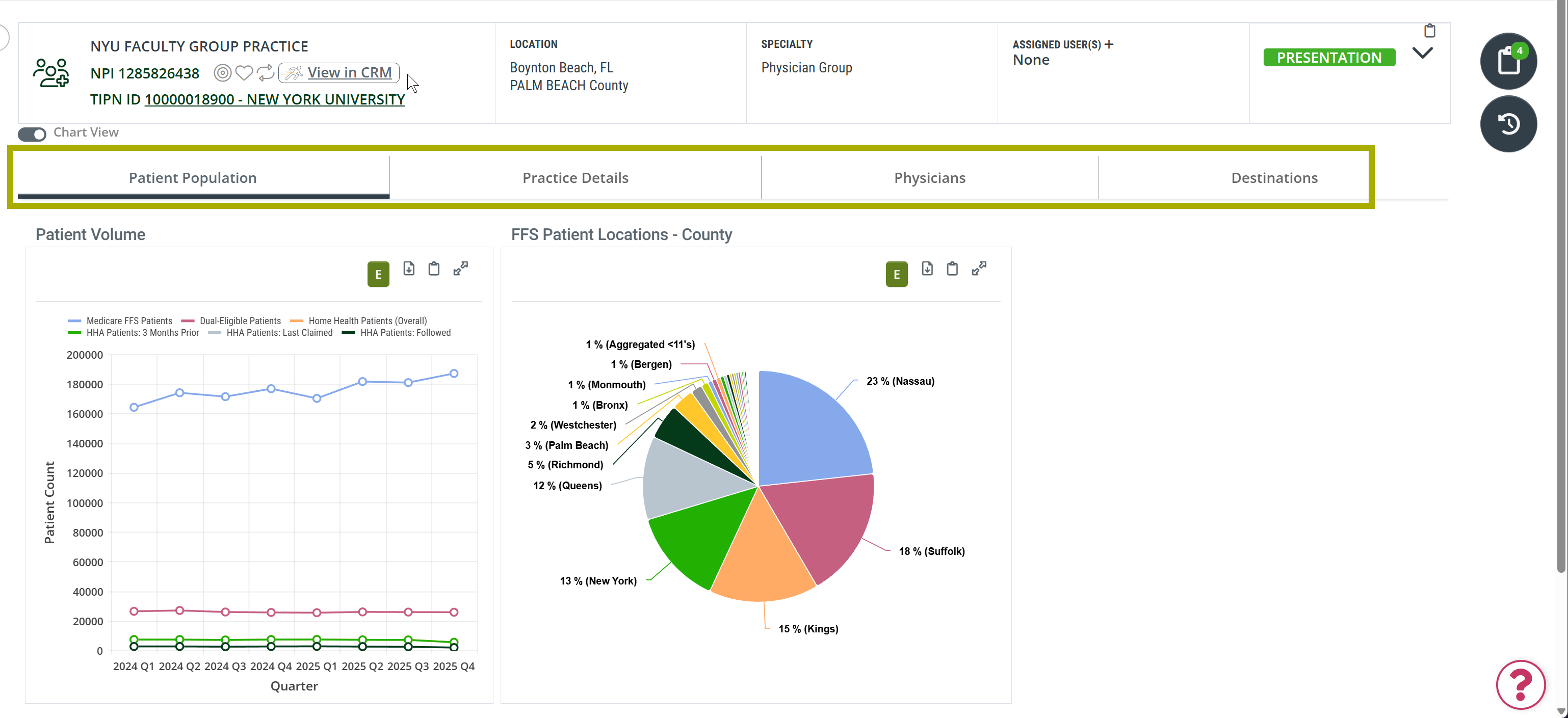
You open a Physician Group Analyze page by clicking a physician group's name on the Physician Groups Explore page. As shown in the image below. the tab bar below the Provider Information panel is your navigation for the Analyze page. Each tab covers a different dimension of the selected group: its patient volume history, the individual physicians in the group, where its patients go for home health, and the group's practice-level details. Each tab has its own dedicated article; this overview introduces each one and includes links directly to the article for each tab.
Page Summary
The table below summarizes each tab on the Physician Group Analyze page. Tab names in the left column link to the full article for that tab.
| Tab | Description |
| Patient Population tab |
Patient demographics and volume data for the selected physician group's home health patients:
|
| Practice Details tab |
Practice-level information for the selected physician group, drawn from the CMS NPI Registry:
|
| Physicians tab |
This table includes a list of individual physicians associated with the selected physician group:
|
| Destinations tab |
Home health agencies that admitted patients treated by the selected physician group:
|
 The content under this tab can be viewed as a table or a chart by using the Chart View toggle near the top left of the page.